
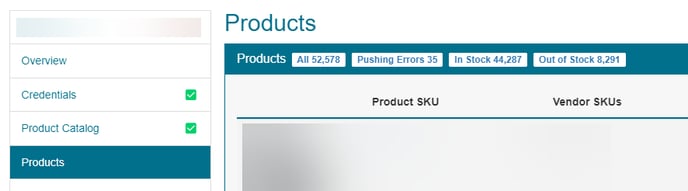
Note: Only filters that meet the criteria below are displayed. For example, if there are no products that meet the criteria for "Discontinued" you will not see the filter for Discontinued appear on your product grid
On a vendor's Products page, each filter only looks at that vendor's Vendor SKUs.
| Pushing | Products that are currently being pushed to your store. |
| Pushing Errors | Products that failed to push to your store. |
| Draft | Products in Spark Shipping that are not in your store yet and are not being pushed. |
| In Stock | A product is considered "In Stock" if any of its associated VendorSkus are in stock. |
| Out of Stock | A product is considered "Out of Stock" if all of its associated VendorSkus are out of stock. |
| In Feed | A product is "In Feed" if any of its associated VendorSkus are listed in any of the vendor's API or FTP feed |
| Discontinued Likely | A product is labeled as "Discontinued Likely" if none of its associated VendorSku appears in any vendor's feed and there has been no stock update for the product for over a month. |
| Discontinued | A product is marked as "Discontinued" when all of its associated vendors have explicitly marked the VendorSku as discontinued. |
| Bad SKU Likely | A product is considered "Bad SKU Likely" if none of its associated VendorSkus appear in any vendor's feed and the product has never received any stock update. |
Not In Feed tag: a product row can also show a yellow Not In Feed tag. This means its Vendor SKU left the vendor's feed less than a month ago. After a month without a stock update it moves to Discontinued Likely.
Exporting: when the Discontinued Likely or Discontinued filter is selected, an Export Products button appears so you can download those products.